Столкнулся с невозможностью зарегистрировать библиотеку в глобальном кэше сборок Windows 2008 R2 (global assembly cache, GAC)
Решилось все довольно просто - следует в локальной политике безопасности отключить режим "Admin Approval Mode". После этого GAC становится доступным для изменения.
Подробнее:
http://blogs.msdn.com/b/mossbiz/archive/2010/06/10/add-an-assembly-to-the-global-assembly-cache-on-windows-server-2008-r2.aspx
Это краткое описание поста для главной страницы А это то что мы спрячем
пятница, 12 ноября 2010 г.


среда, 15 сентября 2010 г.
ITIL v3 - обзор концепции
ITIL - IT Infrastructure Library, библиотека инфраструктуры информационных технологий — библиотека, описывающая лучшие из применяемых на практике способов организации работы подразделений или компаний, занимающихся предоставлением услуг в области информационных технологий.
Источники информации:
http://www.itil.org/en/vomkennen/itil/index.php
http://www.itsmforum.ru/
Стандарт разработан около 20 лет назад организацией CCTA, нынешней OGC (Office of Governance Commerce) в Norwich (England), разработка осуществлялась под контролем британского правительства. Сейчас формально библиотека принадлежит королевскому дому Англии, в частности — нынешней королеве.
В конечном счёте, все процессы ITIL работают на повышение конкурентоспособности, а в наше время даже внутренние ИТ-подразделения компаний не могут чувствовать себя в абсолютной безопасности, так как вынуждены конкурировать с аутсорсинговыми компаниями.

В начале лета 2007 года был опубликована актуальная сейчас 3-я версия стандарта ITIL.
Группу основных материалов стандарта формируют 5 руководств, которые формируют модель жизненного цикла сервиса:
 Service Strategy - Стратегия услуг
Стратегия услуг определяет всеобщую Стратегию для ИТ-услуг и для Управления ИТ-
услугами.
Позволяет получить ясное понимание по следующим вопросам:
Ценность услуги: определяется в терминах бизнес-результатов, получаемых клиентом, и описывается сочетанием двух компонентов:
Модели предоставления услуг:
Этапы развития организации: предоставление услуг через сеть, направление, делегирование, координация или сотрудничество в зависимости от уровня развития организации
Стратегия источников услуг: принятие обоснованных решений по выбору поставщиков услуг с точки зрения внутренних услуг, общих услуг, полного комплекса услуг аутсорсинга, премьер-консорциума или селективного аутсорсинга.
Аналитика Услуг: использование технологий, чтобы помочь достичь понимания производительности Услуг путем анализа
Интерфейсы Услуг: механизмы, с помощью которых пользователи и другие процессы взаимодействия с каждыми Услугами
Управление рисками: фиксация и управление портфелем рисков, лежащих в основе портфеля услуг.
Финансовый менеджмент. Управление портфелем услуг ( Service Portfolio Management (SPM)). Управление спросом.
Service Design - Проектирование услуг
Деятельность или Процесс, который идентифицирует Требования и далее определяет решение, способное удовлетворить эти Требования.
Проектирование соответствующих и инновационных ИТ-услуг, включая их архитектуру, процессы, политики и документацию, для удовлетворения текущих и будущих согласованных бизнес-требований.
Проектирование услуг включает в себя ряд Процессов и Функций.
Основными целями и задачами Проектирования услуг являются:
Поскольку технология является одним из основных компонентов большинства бизнес-процессов, непрерывность или высокая доступность ИТ имеет решающее значение для выживания бизнеса в целом.
Управление информационной безопасностью (Information Security Management (ISM))
Целью процесса ISM является согласование ИТ-безопасности с безопасностью бизнеса
и обеспечение эффективного управление информационной безопасности во всех Услугах и активностях по управлению Услугами так, чтобы:
Источники информации:
http://www.itil.org/en/vomkennen/itil/index.php
http://www.itsmforum.ru/
Стандарт разработан около 20 лет назад организацией CCTA, нынешней OGC (Office of Governance Commerce) в Norwich (England), разработка осуществлялась под контролем британского правительства. Сейчас формально библиотека принадлежит королевскому дому Англии, в частности — нынешней королеве.
В конечном счёте, все процессы ITIL работают на повышение конкурентоспособности, а в наше время даже внутренние ИТ-подразделения компаний не могут чувствовать себя в абсолютной безопасности, так как вынуждены конкурировать с аутсорсинговыми компаниями.
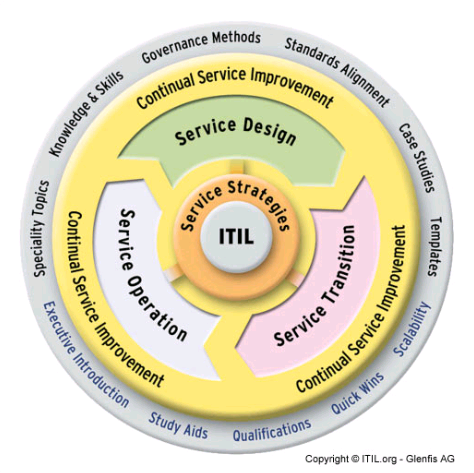
В начале лета 2007 года был опубликована актуальная сейчас 3-я версия стандарта ITIL.
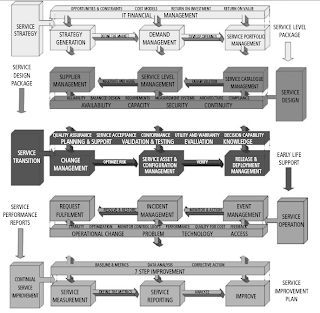
Группу основных материалов стандарта формируют 5 руководств, которые формируют модель жизненного цикла сервиса:
- Service Strategy - Стратегия услуг
- Service Design - Проектирование услуг
- Service Transition - Преобразование услуг
- Service Operation - Эксплуатация услуг
- Continual Service Improvement - Постоянное улучшение услуг
- A means of delivering value to Customers by facilitating Outcomes Customers want to achieve without the ownership of specific Costs and Risks.
- Способ предоставления ценности Заказчикам через содействие им в получении Выходов (результатов на выходе), которых Заказчики хотят достичь без владения специфическими Затратами и Рисками.
 Service Strategy - Стратегия услуг
Стратегия услуг определяет всеобщую Стратегию для ИТ-услуг и для Управления ИТ-
услугами.
Позволяет получить ясное понимание по следующим вопросам:
- какие услуги должны предлагаться
- кому должны предлагаться услуги
- как должна быть подготовлена внутренняя и внешняя рыночная площадка
- существующая и потенциальная конкуренция на этих площадках и конечные цели, которые позволят выделять ценности приносимые вашими услугами
- как заказчики и спонсоры будут воспринимать и оценивать получаемые ценности, и как это ценности будут создаваться
- как заказчики будут выбирать источник услуг в соответствии с использованием разных видов поставщиков услуг
- как прозрачность и управление созданием ценностей будет достигнуто в финансовом управлении
- как будут создаваться внятные бизнес-примеры для защиты стратегических инвестиций в активы услуг и управляемость услуг
- как будет отрегулировано выделение доступных ресурсов для оптимального эффекта всему портфелю услуг
- как будет измерено выполнение услуг.
- Перспектива: характерное видение и направление
- Позиция: основа, на которую провайдер услуги опирается вступая в конкурентную борьбу
- План: как провайдер собирается достигать своих целей
- Профиль: фундаментальный путь ведения бизнеса - характерный профиль в принятии решений и действиях.
Ценность услуги: определяется в терминах бизнес-результатов, получаемых клиентом, и описывается сочетанием двух компонентов:
- Service Utility, Полезность Услуги: то, что клиент получает с точки зрения поддержки результатов и/или удаления ограничений.
- Service Warranty, Гарантии Услуги: как услуга поставляется и его пригодность для использования, с точки зрения доступности, пропускной способности, непрерывности и безопасности.
- Тип I: существует внутри организации исключительно для доставки услуг одной конкретной бизнес-единице
- Тип II: обслуживает несколько подразделений в одной организации
- Тип III: функционирует как внешний поставщик услуг, обслуживающий различных внешних клиентов.
- Возможности: способность поставщика (в плане управления, организации, процессов, знаний и людей) для координации, управления и распределения ресурсов
- Ресурсы: прямые входы для производства услуг, например, финансовых, средств производства, инфраструктурных, приложений, информационных и людских.
Модели предоставления услуг:
- Managed Service, Управляемая Услуга: где подразделение, требующее услугу, полностью финансирует эту услугу для себя.
- Shared Service, Общая услуга: предоставление множества услуг одной или нескольким бизнес-единицам с использованием общей инфраструктуру и ресурсов.
- Utility, Утилита: услуги предоставляются на основе того, сколько требуется по каждому клиенту, как часто и в какое время клиент нуждается в них.
Этапы развития организации: предоставление услуг через сеть, направление, делегирование, координация или сотрудничество в зависимости от уровня развития организации
Стратегия источников услуг: принятие обоснованных решений по выбору поставщиков услуг с точки зрения внутренних услуг, общих услуг, полного комплекса услуг аутсорсинга, премьер-консорциума или селективного аутсорсинга.
Аналитика Услуг: использование технологий, чтобы помочь достичь понимания производительности Услуг путем анализа
Интерфейсы Услуг: механизмы, с помощью которых пользователи и другие процессы взаимодействия с каждыми Услугами
Управление рисками: фиксация и управление портфелем рисков, лежащих в основе портфеля услуг.
Финансовый менеджмент. Управление портфелем услуг ( Service Portfolio Management (SPM)). Управление спросом.
Service Design - Проектирование услуг
Деятельность или Процесс, который идентифицирует Требования и далее определяет решение, способное удовлетворить эти Требования.
Проектирование соответствующих и инновационных ИТ-услуг, включая их архитектуру, процессы, политики и документацию, для удовлетворения текущих и будущих согласованных бизнес-требований.
Проектирование услуг включает в себя ряд Процессов и Функций.
Основными целями и задачами Проектирования услуг являются:
- дизайнерские услуги для достижения согласованных бизнес-результатов
- проектирование процессов для поддержки жизненного цикла сервисов
- выявление и управление рисками
- проектирование безопасной и устойчивой ИТ-инфраструктуры, окружения, приложений и данных / информации, ресурсов и возможностей
- проектирование методов измерения и метрик
- создавать и поддерживать планы, процессы, политики, стандарты, архитектуры, структуры и документы, подтверждающие разработку качественных ИТ-решений
- развитие навыков и возможностей в рамках ИТ-отдела
- способствовать общему улучшению качества ИТ-услуг.
- новые или измененные решения для Услуг
- системы управления услугами и инструменты, особенно Портфель Услуг
- архитектуры технологий и системы управления
- процессы, роли и возможности
- методы измерения и показатели.
- люди: люди, навыки и компетенции, участвующие в предоставлении ИТ-услуг
- продукты: технологии и системы управления, используемые в поставках ИТ-услуг
- процессы: процессы, роли и деятельности, участвующие в предоставлении ИТ-услуг
- партнеры: производители и поставщики, используемые при предоставлении ИТ-услуг.
Проектная документация услуги (Service Design Package (SDP)): определяет все аспекты ИТ-услуг и их требований на каждой стадии жизненного цикла. SDP производится для
каждой новой ИТ-услуги, при ее значительном изменении, или выведения из эксплуатации.
Управление Каталогом услуги (SCM). Управление уровнем услуг (SLM).
Основной информацией, представляемой процессом SLM, включает Соглашение об уровне услуг (SLA), Соглашение операционного уровня (OLA) и другие соглашения о поддержке, а также производство Плана улучшения услуг (SIP) и Плана качества услуг.
каждой новой ИТ-услуги, при ее значительном изменении, или выведения из эксплуатации.
Управление Каталогом услуги (SCM). Управление уровнем услуг (SLM).
Основной информацией, представляемой процессом SLM, включает Соглашение об уровне услуг (SLA), Соглашение операционного уровня (OLA) и другие соглашения о поддержке, а также производство Плана улучшения услуг (SIP) и Плана качества услуг.
Информационная система управления мощностями (CMIS) является краеугольным камнем
успешного процесса Управления мощностями.
Управление доступностью.
успешного процесса Управления мощностями.
Управление доступностью.
- проактивная деятельность: активное планирование, проектирование, рекомендации и улучшение доступности.
- реактивная деятельность: мониторинг, оценка, анализ и управление событиями, инцидентами и проблемами, связанными с недоступностью услугиУправление мощностями.
Управление непрерывностью ИТ-услуг (IT Service Continuity Management (ITSCM))
Поскольку технология является одним из основных компонентов большинства бизнес-процессов, непрерывность или высокая доступность ИТ имеет решающее значение для выживания бизнеса в целом.
Управление информационной безопасностью (Information Security Management (ISM))
Целью процесса ISM является согласование ИТ-безопасности с безопасностью бизнеса
и обеспечение эффективного управление информационной безопасности во всех Услугах и активностях по управлению Услугами так, чтобы:
- информацию можно получить и использовать при необходимости (наличие)
- информацию можно получить или раскрыть только тем, кто имеют право (конфиденциальность)
- информация является полной, точной и защищенной от несанкционированного изменения (целостность)
- бизнес-операциям, а также обмену информации, можно доверять (подлинность и безотказность).
Управление поставщиками
База данных о поставщиках и договорах (SCD) является жизненно важным источником информации о поставщиках и контрактах, и должна содержать все сведения, необходимые для управление поставщиками, контрактами и связанными с ними услугами.
База данных о поставщиках и договорах (SCD) является жизненно важным источником информации о поставщиках и контрактах, и должна содержать все сведения, необходимые для управление поставщиками, контрактами и связанными с ними услугами.
Service Transition - Преобразование услуг
Роль Преобразования услуг заключается в переводе услуг, которые необходимы
Бизнесу, в оперативное использование.
Преобразование услуг поддерживается основными принципами, которые способствуют эффективному и результативному использованию новых / измененных услуг. Ключевые принципы включают в себя:
Управление изменениями.
Изменением Услуги является изменение или удаление уполномоченной, запланированной или поддерживаемой Услуги или компонентов Услуги и связанной с ней документации.
Управление активами Услуги и конфигурацией (SACM).
Для управления большими и сложными ИТ-услугами и инфраструктурами, SACM требует использования системы, известной как Управление конфигурациями (CMS).
Управление знаниями.
Цель управления знаниями заключается в обеспечении определенного сотрудника определенными знаниями, в нужное время для обеспечения и поддержки Услуг, требуемых бизнесом. Это обеспечивает:
Целями планирования перехода и поддержки являются:
Service Operation - Эксплуатация услуг
Ежедневное управление ИТ- услугой, Системой или другими Конфигурационными единицами.
The purpose of Service Operation is to deliver agreed levels of service to users and customers, and to manage the applications, technology and infrastructure that support delivery of the services.
It is important for Service Operation to balance conflicting goals:
An event is a change of state that has significance for the management of a configuration item or IT service.
Incident Management Process.
An incident is an unplanned interruption to an IT service, or a reduction in the quality of an IT service. Failure of a configuration item that has not yet impacted service is also an
incident.
Request Fulfillment Process.
A service request is a request from a user for information or advice, or for a standard change, or for access to an IT service.
Access Management Process.
Problem Management Process.
A problem is a cause of one or more incidents. The cause is not usually known at the time a problem record is created, and the problem management process is responsible for further
investigation.
Common Service Operation Activities.
Service Operation includes a number of activities that are not part of the five processes described. These include:
The Service Desk provides a single central point of contact for all users of IT. The Service Desk usually logs and manages all incidents, service requests and access requests and provides an interface for all other Service Operation processes and activities.
Technical Management Function.
Technical Management includes all the people who provide technical expertise and management of the IT infrastructure.
Application Management Function.
Application Management includes all the people who provide technical expertise and management of applications. As such they carry out a very similar role to Technical Management, but with a focus on software applications rather than infrastructure.
IT Operations Management Function.
IT Operations Management is responsible for the management and maintenance of the IT infrastructure required to deliver the agreed level of IT services to the business.
Continual Service Improvement - Постоянное улучшение услуг
Постоянное улучшение услуг отвечает за управление улучшениями (совершенствованием) в Процессах Управления ИТ-услугами и предоставлении ИТ-услуг. Производительность
Поставщика ИТ-услуг постоянно измеряется, и разрабатываются меры по улучшению Процессов, ИТ-услуг и ИТ-инфраструктуры с целью увеличения Эффективности, Результативности и Эффективности затрат.
Continual Service Improvement (CSI) is concerned with maintaining value for customers through the continual evaluation and improvement of the quality of services and the overall maturity of the ITSM service lifecycle and underlying processes.
7-Step Improvement Process.
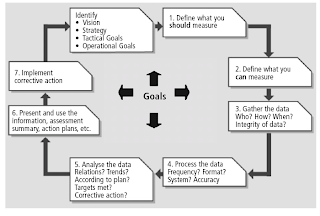
The 7-step improvement process covers the steps required to collect meaningful
data, analyze this data to identify trends and issues, present the information to
management for their prioritization and agreement, and implement
improvements.
There are four basic reasons to monitor and measure, to:
CSI activities as well as other process activities.
Service Reporting.
Бизнесу, в оперативное использование.
Преобразование услуг поддерживается основными принципами, которые способствуют эффективному и результативному использованию новых / измененных услуг. Ключевые принципы включают в себя:
- Понимание всех услуг, их полезности и гарантии - для преобразования Услуги важно знать ее характер и цели с точки зрения результатов и/или удаления бизнес-препятствий (утилитарность) и гарантии того, что полезности будут осуществляться (гарантии).
- Создание официальной политики и общей основы для реализации всех необходимых изменений - согласованность и полнота обеспечивает отсутствие потерь Услуг, спонсоров и сбоев в Услугах.
- Поддержка передачи знаний, поддержки принятия решений и повторное использование процессов, систем и других элементов - эффективное Преобразование услуг обеспечивается с участием всех заинтересованных сторон, с обеспечением соответствующих знаний и доступа и условия, что работа может быть повторно использована в будущем при аналогичных обстоятельствах.
- Прогнозирования и управление "корректировкой курса" - быть активным и определять вероятные потребности коррекции курса и, когда элементы Услуги должны быть скорректированы, это осуществляется логически и полностью документировано.
- Обеспечение участия Преобразования услуг и требований Преобразования услуг во всем жизненном цикле услуг.
Управление изменениями.
Изменением Услуги является изменение или удаление уполномоченной, запланированной или поддерживаемой Услуги или компонентов Услуги и связанной с ней документации.
Управление активами Услуги и конфигурацией (SACM).
Для управления большими и сложными ИТ-услугами и инфраструктурами, SACM требует использования системы, известной как Управление конфигурациями (CMS).
Управление знаниями.
Цель управления знаниями заключается в обеспечении определенного сотрудника определенными знаниями, в нужное время для обеспечения и поддержки Услуг, требуемых бизнесом. Это обеспечивает:
- более эффективные услуги с улучшенным качеством
- четкое общее понимание ценности предоставляемых услуг
- соответствующую информацию, которая всегда доступна.
Целями планирования перехода и поддержки являются:
- планировать и координировать ресурсы для обеспечения требований Стратегии услуг, определенных при Проектировании услуг, эффективно реализуются в эксплуатации услуг
- идентифицировать, управлять и управлять рисками ошибок и нарушений при деятельности по преобразованию.
Service Operation - Эксплуатация услуг
Ежедневное управление ИТ- услугой, Системой или другими Конфигурационными единицами.
The purpose of Service Operation is to deliver agreed levels of service to users and customers, and to manage the applications, technology and infrastructure that support delivery of the services.
It is important for Service Operation to balance conflicting goals:
- internal IT view versus external business view
- stability versus responsiveness
- quality of service versus cost of service
- reactive versus proactive activities.
An event is a change of state that has significance for the management of a configuration item or IT service.
Incident Management Process.
An incident is an unplanned interruption to an IT service, or a reduction in the quality of an IT service. Failure of a configuration item that has not yet impacted service is also an
incident.
Request Fulfillment Process.
A service request is a request from a user for information or advice, or for a standard change, or for access to an IT service.
Access Management Process.
Problem Management Process.
A problem is a cause of one or more incidents. The cause is not usually known at the time a problem record is created, and the problem management process is responsible for further
investigation.
Common Service Operation Activities.
Service Operation includes a number of activities that are not part of the five processes described. These include:
- monitoring and control: to detect the status of services and CIs and take appropriate corrective action
- console management/operations bridge: a central coordination point for monitoring and managing services
- management of the infrastructure: storage, databases, middleware, directory services, facilities/data centre etc.
- operational aspects of processes from other lifecycle stages: Change, Configuration, Release and Deployment, Availability, Capacity, Knowledge, Service Continuity Management etc.
The Service Desk provides a single central point of contact for all users of IT. The Service Desk usually logs and manages all incidents, service requests and access requests and provides an interface for all other Service Operation processes and activities.
Technical Management Function.
Technical Management includes all the people who provide technical expertise and management of the IT infrastructure.
Application Management Function.
Application Management includes all the people who provide technical expertise and management of applications. As such they carry out a very similar role to Technical Management, but with a focus on software applications rather than infrastructure.
IT Operations Management Function.
IT Operations Management is responsible for the management and maintenance of the IT infrastructure required to deliver the agreed level of IT services to the business.
Continual Service Improvement - Постоянное улучшение услуг
Постоянное улучшение услуг отвечает за управление улучшениями (совершенствованием) в Процессах Управления ИТ-услугами и предоставлении ИТ-услуг. Производительность
Поставщика ИТ-услуг постоянно измеряется, и разрабатываются меры по улучшению Процессов, ИТ-услуг и ИТ-инфраструктуры с целью увеличения Эффективности, Результативности и Эффективности затрат.
Continual Service Improvement (CSI) is concerned with maintaining value for customers through the continual evaluation and improvement of the quality of services and the overall maturity of the ITSM service lifecycle and underlying processes.
7-Step Improvement Process.

The 7-step improvement process covers the steps required to collect meaningful
data, analyze this data to identify trends and issues, present the information to
management for their prioritization and agreement, and implement
improvements.
- Step 1 - Define what you should measure
- Step 2 - Define what you can measure
- Step 3 - Gather the data
- Step 4 - Process the data
- Step 5 - Analyze the data
- Step 6 - Present and use the Information
- Step 7 - Implement corrective action
There are four basic reasons to monitor and measure, to:
- validate previous decisions that have been made
- direct activities in order to meet set targets - this is the most prevalent reason for monitoring and measuring
- justify that a course of action is required, with factual evidence or proof
- intervene at the appropriate point and take corrective action.
CSI activities as well as other process activities.
- Technology metrics: often associated with component and applicationbased metrics such as performance, availability.
- Process metrics: captured in the form of Critical Success Factors (CSFs), Key Performance Indicators (KPIs) and activity metrics.
- Service metrics: the results of the end-to-end service.
Service Reporting.

понедельник, 2 августа 2010 г.
Решение проблемы с MS Exchange 2007 при подключении к нему по протоколу POP3
При попытке обратиться к Microsoft Exchange 2007 по протоколу POP3 выдается ошибка
POP3: 10:54:43 [rx] +OK Microsoft Exchange Server 2007 POP3 service ready
POP3: 10:54:43 [tx] USER testuser
POP3: 10:54:43 [rx] -ERR Command is not valid in this state.
И эта ошибка сопровождает все попытки ввести команды POP3.
Для преодоления проблемы следует изменить ваутентификацию POP3 на "Plain text"(Server Configuration, Client Access, POP3, Properties, Authentication) и перестартовать сервис POP3.
После этого стандартный диалог POP3 проходит успешно, можно получать почту через клиентов POP3 и при помощи обычной telnet-сессии на 110 порт.
POP3: 10:54:43 [rx] +OK Microsoft Exchange Server 2007 POP3 service ready
POP3: 10:54:43 [tx] USER testuser
POP3: 10:54:43 [rx] -ERR Command is not valid in this state.
И эта ошибка сопровождает все попытки ввести команды POP3.
Для преодоления проблемы следует изменить в
После этого стандартный диалог POP3 проходит успешно, можно получать почту через клиентов POP3 и при помощи обычной telnet-сессии на 110 порт.
понедельник, 28 июня 2010 г.
LPI 102 - подготовка к экзамену. Заметки.
При подготовке к экзамену 117-102 из серии Junior Level Linux Professional (LPIC-1) были сделаны следующие заметки.
- Изменить срок действия пароля можно при помощи команд usermod, passwd, chage.
- Утилита tcpd использует файл hosts.allow для управления доступом к сервисам системы.
- Экранная клавиатура называется GOK.
- Для отображения кода выхода после выполнения последней команды echo $?.
- Для добавления шлюза по умолчанию route add default gw 192.168.1.1.
- Записи в /etc/hosts должны быть вида 127.0.0.1 localhost.localdomain localhost
- Для остановки сервера печати CUPS c отключением всех заданий на печать с сообщением "hello" надо задать команду cupsdisable -c -r hello HPLaserjet4
- Для коррекции аппаратных часов следует задать команду hwclock --hctosys --localtime.
- В локали не содержится настройка временной зоны
- В crontab записи должны заканчиваться символом новой строки.
- Утилита для чтения текста на экране с текстовым интерфейсом управления emacspeak
- Утилита для применения изменений к существующему ядру в файл diff - patch
- Для корректного рестарта Apache рекомендуется использовать команду apachectl graceful
- В файле smb.conf для отключения аутентификации при доступе к папке следует указать параметр security=share.
- Для трансформации файла паролей shadow в формат md5-совместимости следует выполнить команду pwconv.
- Для получения вновь адреса IP по dhcp можно использовать утилиты dhclient, pump, dhcpcd.
- Для временного удаления переменной окружения для определенного скрипта следует запустить команду env -u foobar myscript
- Команды для загрузки модулей ядра modprobe, insmod
- Для ознакомления с параметрами, которые могут быть использованы с модулем ядра, надо использовать команду modinfo -p
- depmod создает файл связей модулей modules.dep. Для перестроения этого файла используют команду depmod -a.
- Информация по теме Linux содержится на сайтах lwn.net, linux today, newsforge
- logrotate создает новые логи и удаляет старые
- 00 18-07 **1-5 logout-users - скрипт каждый час отключающий пользователей с 18-7 часов, с пн по пт.
- restore восстанавливает бекап, сделанный при помощи команды dump
- export PS2="[\u\w]\\$" меняет второе приглашение на имя пользователя и рабочую директорию
- Разрешения: для файла /etc/passwd -wr-r--r--, для файла /etc/shadow --r-------
- atrm удаляет приостановленные задачи at
- в файле /etc/protocol записи должны быть вида udp 17 UDP
- При использовании файлов /etc/ppp/peers/* файл /etc/ppp/options должен быть пустой
- В файле /etc/nsswitch.conf должны быть записи вида hosts: files, dns
- В файле /etc/host.conf записи должны быть вида order: hosts, bind
- В файле /etc/services записи должны быть вида tftp 69/udp
- Для разрешения доступа root к папке nfs следует прописать разрешение no_root_squash
- Для доступа к удаленному хосту при помощи сгенерированного DSA-ключа надо разместить этот ключ в директории $HOME/.ssh/authorized_keys на удаленном хосте и в директории $HOME/.ssh/id_dsa на локальном хосте.
- Настройки для исходящих соединений по ssh следует делать в файле /etc/ssh/ssh_conf
- wins и nmbd разрешают имена wins в ip адрес.
- Конфигурационные файлы samba /etc/smb.conf и /etc/samba/smb.conf
- smbstatus показывает соединения к серверу samba
- smbadduser привязывает пользователей windows к пользователям linux
- crtsct - параметр аппаратного контроля потока для демона PPP
- Для запрета соединения root через ssh следует указать PermitRootLogin No
- telinit 1 переводит систему в однопользовательский режим
- для изменения или отключения комбинации alt-ctrl-del следует изменить файл /etc/inittab
- "." @foobar отсылает все системные сообщения на сервер foobar
- Поменять ассоциацию желаемой программы с определенным видом файлов можно в файле .bashrc
- /etc/profile содержит переменные для всех пользователей
- lpadmin используется для администрирования CUPS
- В директории /var/spool/mail содержится доставленная почта для определенных пользователей
- /etc/hosts и /etc/nsswitch.conf это файлы связанные с разрешением имен
- Для временного запрета пользователю на соединение с системой следует изменить его оболочку на /etc/false
- /etc/issue.net содержит текст приветствия для пользователей, соединяющихся по telnet
- На страницах man содержится информация о программных библиотеках, командах суперпользователей, конфигурационные команды.
- В файле /etc/hosts содержатся записи типа 192.168.0.1 dns-server
- FontPath "Server/:7000" означает что шрифты загружаются с сервера
- Тема рабочего стола изменяется в файле /etc/X11/xdm/Xsetup для менеджера XDM
- Приветствие в Гноме меняется в файле /etc/X11/gdm/init/Default
- Для перевода системы на временной пояс UTC следует выполнить команду
ln -s /usr/share/zoneinfo/UTC /etc/localtime - Шары NFS конфигурируются через файл /etc/exports
- Список компьютеров для соединения с сервером печати расположен в файле /etc/hosts.lpd
- all-squash в файле fstab приравнивает всех подключающихся к файловой системе к анонимным пользователям
- DocumentRoot - директива Apache для указания на адрес корневой папки http файлов.
- Для отключения сервиса telnet надо закомментировать его настройку в файле /etc/httpd.conf
- /etc/aliases - в этом файле Sendmail держит списки почтовых алиасов.
- Для конфигурирования Apache используются файлы httpd.conf и srm.conf
- Для закрытия релея в Sendmail следует сконфигурировать файл /etc/sendmail.cf
- /product company (r,w) - означает что файловая система /product будет эскпортирована в NFS для монтирования к серверу company
- lsmod выдает информацию в формате "название, размер, использованные счетчики, список ссылающихся модулей"
- lsmod выдает информацию аналогичную той, что находится в фале /proc/modules. В этом файле находится список загруженных модулей.
- Для выгрузки загружаемого модуля из ядра используют утилиту rmmod
- make oldconfig собирает ядро из старых конфигурационных файлов.
- /usr/share/doc содержит файлы документации, сгенерированные устанавливаемыми программами
- доступные функции можно посмотреть при помощи команды declare -f
- AuthUserFile /etc/apache2/users и AuthName используются в конфигурации Apache для активации аутентификации
- /etc/ssh_host_key должно быть доступно для прочтения пользователям SSH
- информацию о сроке активности учетной записи в файле /etc/shadow лучше всего менять утилитой chage
- В файле crontab существует 5 полей для определения времени запуска задания.
- Сообщения от ядра содержатся в файлах /var/log/boot.log и /var/log/dmesg
- Файл с приветствием пользователей при локальном заходе - /etc/issue
- local2.* /dev/console показывает все сообщения от демона ppp с меткой local2
- make menuconfig позволяет конфигурировать ядро в системе меню
- ServerRoot определяет корневую директорию в которой работает Apache
- local-host-names определяет имена машин для Sendmail.
- make dep проверяет зависимости после конфигурирования ядра системы
- /var/spool/lpd директория в которой находится очередь печати
- #! в начале файла определяет интерпретатор скрипта
- /etc/nologin - запрещает логин пользователей
- bash -r | rbash - вход в ограниченный режим
- bind определяет в конфигурации xinetd порт, с которого будет работать ПО
- [.]* определяет все файлы или директории с именем, начинающимся с точки
- /etc/at.deny запрещает запуск заданий пользователям при помощи at или batch
- /etc/cups/cupsd.conf содержит конфигурацию сервера печати
- --edit-key переводит в меню конфигурирования gpg
- xwininfo -metric позволяет определить геометрию окна в Linux
- route del default удаляет шлюз по-умолчанию из таблицы маршрутизации
- logger генерирует логи с заданными метками
- tar -tf /dev/st0 проверяет ленту с записью резервной копии
- /var/log/wtmp хранит историю команд
- /etc/exports содержит список директорий nfs
- apachectl configtest - проверяет правильность конфига Apache
- newaliases создает алиасы к почтовому ящику и перестраивает базу алиасов в файле /etc/aliases
- portmap - сервис назначающий порты другим сервисам
- exportfs применяет измнения, сделанные в конфигурации NFS
- lpr - команда для отсылки на печать данных из командной строки
- /etc/ppp/pap-secrets файл должен иметь права на чтение только для root
- lpr -l обходит фильтры сервера печати
- /etc/printcap файл с конфигурациями очереди печати
- 23 0-23/2 *** /myscript - скрипт запускается каждые 23 минуты после полуночи каждые 2 часа
- iptables -t nat -L позволяет увидель таблицу трансляции адресов
- XF86Config файл содержит секцию Files в которой указывается информация о шрифтах
- mkboot --device /dev/fd0 2.4.18-12 создает в Debian загрузочную дискету
- lpc topq печатает задание не смотря на его место в очереди на печать
- export PATH=$PATH:$APPLICATION обновляет путь директорией application
- /boot/module-info содержит параметры для модулей ядра, которые считываются ими при заргузке.
пятница, 16 апреля 2010 г.
LPI exam 102 prep: Shells, scripting, programming, and compiling
Краткие заметки, сделанные при подготовке к сдаче экзамена LPI 117-102 (Junior Level Linux Professional (LPIC-1)).
Shell customization
POSIX is the Portable Operating System Interface for uniX.
Well known shells include the Korn shell (ksh), the C shell (csh) and its derivative tcsh, the Almquist shell (ash) and its Debian derivative (dash).
Shells, including bash, allow you to create and modify shell
variables, which you may export to your environment for use by other processes
running in the shell or by other shells that you may spawn from the current shell.
Table 3. Common bash environment variables
Name Function
USER The name of the logged-in user
UID The numeric user id of the
logged-in user
HOME The user's home directory
PWD The current working directory
SHELL The name of the shell
$ The process id (or PID of the running Bash shell (or other) process)
PPID The process id of the process that started this process (that is, the id of the parent process)
? The exit code of the last command
When you create a shell variable, you will often want to export it to the environment
so it will be available to other processes that you start from this shell. Variables that
you export are not available to a parent shell.
In shells such as the C and tcsh shells, you use the set command to set variables in
your shell, and the setenv command to set and export variables. The syntax differs
slightly from that of the export command.
You remove a variable from the Bash shell using the unset command.
You can use
the -v option to be sure that you are removing a variable definition. Functions can
have the same name as variables, so use the -f if you want to remove a function
definition. Without either -f or -v, the bash unset command removes a variable
definition if it exists; otherwise, it removes a function definition if one exists.
If this shell is bash, then it executes several profile scripts before you get
control. If /etc/profile exists, it is executed first. Depending on your distribution, other
scripts in the /etc tree may also be executed, for example, /etc/bash.bashrc or
/etc/bashrc. Once the system scripts have run, a script in your home directory is run
if it exists. Bash looks for the files ~/.bash_profile, ~/.bash_login, and ~/.profile in that
order. The first one found is executed.
You may force bash to read profiles as if it were a login shell using the --login
option. If you do not want to execute the profiles for a login shell, specify the
--noprofile option. Similarly, if you want to disable execution of the ~/.bashrc file
for an interactive shell, start bash with the --norc option.
The Bash shell allows you to define aliases for commands.
You can also use the alias command to display all the aliases if you use it with no
options or with just the -p option, and you can display the aliases for one or more
names by giving the names as arguments without assignments. Listing 10 shows the
aliases for which and vi.
Sometimes called the "Swiss army knife" of the UNIX and Linux toolbox, sed is an
extremely powerful editing filter that uses regular expressions. You now understand
that the challenge is to strip off the first 8 words and the blanks that follow them from
every line of output that begins with 'd'. You can do it all with sed: select only those
lines you are interested in using the pattern-matching expression /^d/, substituting
a null string for the first eight words using the substitute command
s/^d\([^ ]* *\)\(8\}//. Use the -n option to print only lines that you specify
with the p command
Inside the function, you can refer to the parameters using the bash special variables
in Table 4. You prefix these with a $ symbol to reference them as with other shell
variables.
Shell parameters for functions
0, 1, 2, ... The positional parameters starting from
parameter 0. Parameter 0 refers to the
name of the program that started bash,
or the name of the shell script if the
function is running within a shell script.
See the bash man pages for
information on other possibilities, such
as when bash is started with the -c
parameter. A string enclosed in single
or double quotes will be passed as a
single parameter, and the quotes will
be stripped. In the case of double
quotes, any shell variables such as
$HOME will be expanded before the
function is called. You will need to use
single or double quotes to pass
parameters that contain embedded
blanks or other characters that might
have special meaning to the shell.
* The positional parameters starting from
parameter 1. If the expansion is done
within double quotes, then the
expansion is a single word with the first
character of the interfield separator
(IFS) special variable separating the
parameters or no intervening space if
IFS is null. The default IFS value is a
blank, tab, and newline. If IFS is unset,
then the separator used is a blank, just
as for the default IFS.
@ The positional parameters starting from
parameter 1. If the expansion is done
within double quotes, then each
parameter becomes a single word, so
that "$@" is equivalent to "$1" "$2" ....
If your parameters are likely to contain
embedded blanks, you will want to use
this form.
# The number of parameters, not
including parameter 0.
Shell scripts
test and [
The test builtin command returns 0 (True) or 1 (False) depending on the evaluation
of an expression expr. You can also use square brackets so that test expr and
[ expr ] are equivalent. You can examine the return value by displaying $?; you can
use the return value as you have before with && and ||; or you can test it using the
various conditional constructs that are covered later in this section.
(( and [[
The test command is very powerful, but somewhat unwieldy with its requirement
for escaping and the difference between string and arithmetic comparisons.
Fortunately bash has two other ways of testing that are somewhat more natural for
people who are familiar with C, C++, or Java syntax. The (( )) compound
command evaluates an arithmetic expression and sets the exit status to 1 if the
expression evaluates to 0, or to 0 if the expression evaluates to a non-zero value.
You do not need to escape operators between (( and )). Arithmetic is done on
integers. Division by 0 causes an error, but overflow does not. You may perform the
usual C language arithmetic, logical, and bitwise operations. The let command can
also execute one or more arithmetic expressions. It is usually used to assign values
to arithmetic variables.
If, then, else statements
The bash if command is a compound command that tests the return value of a test
or command ($? and branches based on whether it is True (0) or False (not 0).
Although the tests above returned only 0 or 1 values, commands may return other
values. You will learn more about testing those a little later in this tutorial. The if
command in bash has a then clause containing a list of commands to be executed
if the test or command returns 0. The command also has one or more optional elif
clauses. Each of these optional elif clauses has an additional test and then
clause with an associated list of commands, an optional final else clause, and list of
commands to be executed if neither the original test, nor any of the tests used in the
elif clauses was true. A terminal fi marks the end of the construct.
The Bash shell has a shopt builtin that allows you to set or unset many shell
options. One is nocasematch, which, if set, instructs the shell to ignore case in
string matching.
Loops
Bash and other shells have three looping constructs that are somewhat similar to
those in the C language. Each will execute a list of commands zero or more times.
The list of commands is surrounded by the words do and done, each preceded by a
semicolon.
for
loops come in two flavors. The most common form in shell scripting iterates
over a set of values, executing the command list once for each value. The set
may be empty, in which case the command list is not executed. The other form
is more like a traditional C for loop, using three arithmetic expressions to
control a starting condition, step function, and end condition.
while
loops evaluate a condition each time the loop starts and execute the command
list if the condition is true. If the condition is not initially true, the commands are
never executed.
until
loops execute the command list and evaluate a condition each time the loop
ends. If the condition is true the loop is executed again. Even if the condition is
not initially true, the commands are executed at least once.
Shell customization
POSIX is the Portable Operating System Interface for uniX.
Well known shells include the Korn shell (ksh), the C shell (csh) and its derivative tcsh, the Almquist shell (ash) and its Debian derivative (dash).
Shells, including bash, allow you to create and modify shell
variables, which you may export to your environment for use by other processes
running in the shell or by other shells that you may spawn from the current shell.
Table 3. Common bash environment variables
Name Function
USER The name of the logged-in user
UID The numeric user id of the
logged-in user
HOME The user's home directory
PWD The current working directory
SHELL The name of the shell
$ The process id (or PID of the running Bash shell (or other) process)
PPID The process id of the process that started this process (that is, the id of the parent process)
? The exit code of the last command
When you create a shell variable, you will often want to export it to the environment
so it will be available to other processes that you start from this shell. Variables that
you export are not available to a parent shell.
In shells such as the C and tcsh shells, you use the set command to set variables in
your shell, and the setenv command to set and export variables. The syntax differs
slightly from that of the export command.
You remove a variable from the Bash shell using the unset command.
You can use
the -v option to be sure that you are removing a variable definition. Functions can
have the same name as variables, so use the -f if you want to remove a function
definition. Without either -f or -v, the bash unset command removes a variable
definition if it exists; otherwise, it removes a function definition if one exists.
If this shell is bash, then it executes several profile scripts before you get
control. If /etc/profile exists, it is executed first. Depending on your distribution, other
scripts in the /etc tree may also be executed, for example, /etc/bash.bashrc or
/etc/bashrc. Once the system scripts have run, a script in your home directory is run
if it exists. Bash looks for the files ~/.bash_profile, ~/.bash_login, and ~/.profile in that
order. The first one found is executed.
You may force bash to read profiles as if it were a login shell using the --login
option. If you do not want to execute the profiles for a login shell, specify the
--noprofile option. Similarly, if you want to disable execution of the ~/.bashrc file
for an interactive shell, start bash with the --norc option.
The Bash shell allows you to define aliases for commands.
You can also use the alias command to display all the aliases if you use it with no
options or with just the -p option, and you can display the aliases for one or more
names by giving the names as arguments without assignments. Listing 10 shows the
aliases for which and vi.
Sometimes called the "Swiss army knife" of the UNIX and Linux toolbox, sed is an
extremely powerful editing filter that uses regular expressions. You now understand
that the challenge is to strip off the first 8 words and the blanks that follow them from
every line of output that begins with 'd'. You can do it all with sed: select only those
lines you are interested in using the pattern-matching expression /^d/, substituting
a null string for the first eight words using the substitute command
s/^d\([^ ]* *\)\(8\}//. Use the -n option to print only lines that you specify
with the p command
Inside the function, you can refer to the parameters using the bash special variables
in Table 4. You prefix these with a $ symbol to reference them as with other shell
variables.
Shell parameters for functions
0, 1, 2, ... The positional parameters starting from
parameter 0. Parameter 0 refers to the
name of the program that started bash,
or the name of the shell script if the
function is running within a shell script.
See the bash man pages for
information on other possibilities, such
as when bash is started with the -c
parameter. A string enclosed in single
or double quotes will be passed as a
single parameter, and the quotes will
be stripped. In the case of double
quotes, any shell variables such as
$HOME will be expanded before the
function is called. You will need to use
single or double quotes to pass
parameters that contain embedded
blanks or other characters that might
have special meaning to the shell.
* The positional parameters starting from
parameter 1. If the expansion is done
within double quotes, then the
expansion is a single word with the first
character of the interfield separator
(IFS) special variable separating the
parameters or no intervening space if
IFS is null. The default IFS value is a
blank, tab, and newline. If IFS is unset,
then the separator used is a blank, just
as for the default IFS.
@ The positional parameters starting from
parameter 1. If the expansion is done
within double quotes, then each
parameter becomes a single word, so
that "$@" is equivalent to "$1" "$2" ....
If your parameters are likely to contain
embedded blanks, you will want to use
this form.
# The number of parameters, not
including parameter 0.
Shell scripts
test and [
The test builtin command returns 0 (True) or 1 (False) depending on the evaluation
of an expression expr. You can also use square brackets so that test expr and
[ expr ] are equivalent. You can examine the return value by displaying $?; you can
use the return value as you have before with && and ||; or you can test it using the
various conditional constructs that are covered later in this section.
(( and [[
The test command is very powerful, but somewhat unwieldy with its requirement
for escaping and the difference between string and arithmetic comparisons.
Fortunately bash has two other ways of testing that are somewhat more natural for
people who are familiar with C, C++, or Java syntax. The (( )) compound
command evaluates an arithmetic expression and sets the exit status to 1 if the
expression evaluates to 0, or to 0 if the expression evaluates to a non-zero value.
You do not need to escape operators between (( and )). Arithmetic is done on
integers. Division by 0 causes an error, but overflow does not. You may perform the
usual C language arithmetic, logical, and bitwise operations. The let command can
also execute one or more arithmetic expressions. It is usually used to assign values
to arithmetic variables.
If, then, else statements
The bash if command is a compound command that tests the return value of a test
or command ($? and branches based on whether it is True (0) or False (not 0).
Although the tests above returned only 0 or 1 values, commands may return other
values. You will learn more about testing those a little later in this tutorial. The if
command in bash has a then clause containing a list of commands to be executed
if the test or command returns 0. The command also has one or more optional elif
clauses. Each of these optional elif clauses has an additional test and then
clause with an associated list of commands, an optional final else clause, and list of
commands to be executed if neither the original test, nor any of the tests used in the
elif clauses was true. A terminal fi marks the end of the construct.
The Bash shell has a shopt builtin that allows you to set or unset many shell
options. One is nocasematch, which, if set, instructs the shell to ignore case in
string matching.
Loops
Bash and other shells have three looping constructs that are somewhat similar to
those in the C language. Each will execute a list of commands zero or more times.
The list of commands is surrounded by the words do and done, each preceded by a
semicolon.
for
loops come in two flavors. The most common form in shell scripting iterates
over a set of values, executing the command list once for each value. The set
may be empty, in which case the command list is not executed. The other form
is more like a traditional C for loop, using three arithmetic expressions to
control a starting condition, step function, and end condition.
while
loops evaluate a condition each time the loop starts and execute the command
list if the condition is true. If the condition is not initially true, the commands are
never executed.
until
loops execute the command list and evaluate a condition each time the loop
ends. If the condition is true the loop is executed again. Even if the condition is
not initially true, the commands are executed at least once.
Подписаться на:
Сообщения (Atom)